
Personalized direct mail used to require a lot of manual coordination. A designer had to create variations, a marketer had to manage audience files, and someone had to make sure the right version reached the right person.
That process can slow teams down, especially when campaigns rely on different names, offers, images, locations, or follow-up paths. Today, teams can use templates, customer data, and automation to create personalized postcards and letters without building every version by hand.
The goal is not to make every mailpiece feel overly customized. It is to make each piece relevant, accurate, and easier to manage at scale.
What is variable data printing?
Variable data printing, or VDP, is a print process that allows unique details to change from one mailpiece to the next. Instead of creating a separate design file for every recipient, teams build one template with fields that can update automatically.
For example, a postcard template may include fields for:
- First name
- Local branch or store location
- Offer code
- Renewal date
- QR code
- Personalized URL
- Product or service category
- Image variation
When the campaign is prepared for print, the system pulls the right information into each field. The base design stays the same, while selected elements change based on the recipient data.
This is what makes personalized direct mail easier to scale. A team can create one approved template, connect it to customer data, and produce relevant versions without manually editing every piece.
Why personalization depends on clean data
Personalization only works when the data behind it is accurate and consistent. If the data is messy, the final mailpiece can feel awkward or careless.
A simple first-name field can create problems if records are formatted inconsistently. One record may say “Bob,” another may say “ROBERT,” and another may include a title or suffix. Address fields can create similar issues when apartment numbers, ZIP codes, or street abbreviations are missing or inconsistent.
Before building a personalized postcard or letter, review the data fields the template will use. Look for:
- Missing names
- Inconsistent capitalization
- Duplicate records
- Outdated addresses
- Empty offer fields
- Customer segments that are too broad or too narrow
- Data that feels too personal for a physical mailpiece
The best personalization feels useful, not invasive. A relevant renewal reminder or local offer can feel helpful. A mailpiece that references too much individual behavior can feel uncomfortable.
What you can personalize in postcards and letters
Personalized direct mail does not have to mean a fully custom design for every recipient. In most cases, the strongest approach is to keep the core design consistent and personalize the elements that matter most.
Names, headlines, and message variations
First names are the most obvious place to start, but they are not the only option. Teams can also personalize the headline, subhead, or body copy based on audience segment.
For example, a customer who recently made a purchase may receive a different message than someone who has not engaged in a while. A new customer may need onboarding information, while a long-time customer may respond better to a loyalty-focused message.
The key is to plan these variations before design begins. That way, the template can support different copy lengths without creating layout issues.
Offers and promo codes
Offers are often one of the most useful personalization fields. A team may want to send different offers to new customers, returning customers, lapsed customers, or high-value accounts.
Unique promo codes can also help connect a response back to a specific campaign or audience. This makes it easier to understand which version of a mailpiece encouraged action.
Images and local details
Images can change based on audience, region, product interest, or location. A national brand may use regional imagery. A company with multiple branches may include the recipient’s nearest location.
Local details can also make a mailpiece feel more relevant. This might include a nearby office, event location, service area, or contact information for a local representative.
QR codes and personalized URLs
QR codes and personalized URLs help connect direct mail to digital follow-up. Each recipient can receive a unique code or link that leads to a landing page, account page, booking flow, or offer page.
Dynamic QR code tracking can connect each mailpiece to a digital action, making it easier to see how recipients engage after receiving the postcard or letter.
How to build templates that personalize automatically
A personalized mail campaign starts with the template. The stronger the template setup, the less manual work the team has to do later.
Define static and dynamic areas
Start by separating the parts of the design that will stay the same from the parts that will change.
Static elements may include:
- Logo
- Brand colors
- Legal copy
- General campaign message
- Footer information
- Required postal elements
Dynamic elements may include:
- Name
- Offer
- Image
- QR code
- Location
- Date
- Account or membership detail
- Segment-specific headline
This helps designers build a template that supports personalization from the start.
Plan for long names and missing fields
Dynamic fields need guardrails. A short name may fit perfectly, but a long name can break a layout. A missing field can leave a blank space or create an awkward sentence.
Before sending, create fallback language for every dynamic field. For example, if a first name is missing, the template can use a general greeting instead. If an offer code is missing, the system should either use a default offer or remove that section from the piece.
These small safeguards help prevent personalization errors from reaching customers.
Preview real data variations
Templates should be tested with real or realistic data before production. Review examples with long names, missing fields, special characters, different image sizes, and different offer types.
This is where teams can catch issues like text overflow, awkward line breaks, low-quality images, or fields pulling from the wrong source.
For teams using direct mail software, template previews can help reduce manual proofing work while still giving marketers a way to review the final experience before sending.
The automated workflow from CRM to mailbox
The biggest shift is operational. Instead of exporting lists, sending files to a vendor, waiting on proofs, and manually tracking each step, teams can connect direct mail to the systems they already use.
With automated direct mail, teams can connect customer data, templates, and mailing workflows so campaigns are easier to launch and repeat.
Here is how that workflow usually works.
1. Connect your customer data
Personalized direct mail begins with a data source. That may be a CRM, CDP, marketing automation platform, ecommerce platform, or internal database.
The data source provides the fields that populate the template. This may include names, addresses, customer segments, purchase history, renewal dates, or campaign eligibility.
When teams send direct mail automatically from their CRM platform, customer data can flow into the campaign without constant exports, file handoffs, or manual list management.
2. Segment the audience or set campaign triggers
Next, define who should receive the mailpiece and why.
For a batch campaign, the audience may be based on a customer segment. For an automated program, the mailpiece may be triggered by a behavior or milestone, such as:
- Account creation
- Abandoned cart
- Policy renewal
- Appointment reminder
- Loyalty milestone
- Win-back campaign
- Local event invitation
A clear trigger helps make the mailpiece feel relevant. It also helps teams avoid sending mail too broadly.
3. Generate the mailpiece from a template
Once the audience and data fields are set, the mailpiece can be generated from the approved template.
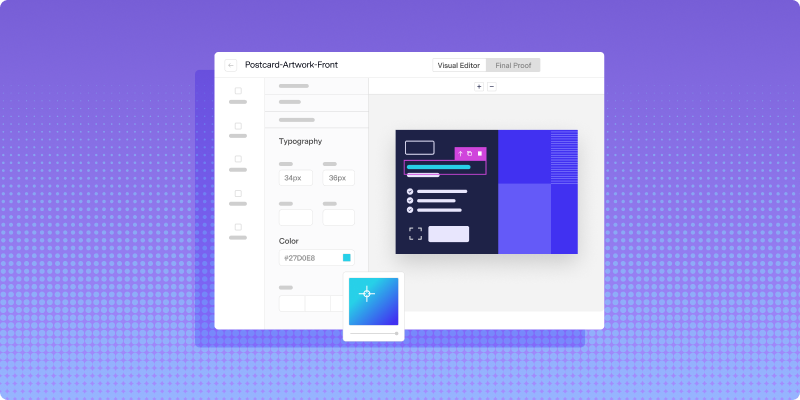
Marketers may use a visual editor or template builder. Developers may use an API to create mailpieces programmatically. Either way, the goal is the same: use one controlled template to create personalized mail without manually designing every version.
4. Validate addresses before production
Address quality is one of the most important parts of direct mail execution. Even a strong design and offer will not matter if the mailpiece cannot be delivered.
Address validation helps confirm that addresses are complete, properly formatted, and usable for mailing. Teams may also use processes like CASS certification and NCOA updates to support better address quality.
This step is especially important for personalized campaigns because customer data often comes from multiple systems. A campaign may use CRM data, ecommerce data, marketing automation data, or internal customer records. Reviewing address quality before production helps reduce avoidable errors.
5. Send to print and mail production
After the template, audience, and address data are ready, the campaign can move into production.
In a manual process, this step often requires vendor coordination, file transfers, proofing rounds, and separate reporting. With an automated workflow, much of that coordination can be handled inside the mail platform.
This does not remove the need for review. It simply gives teams a more controlled way to move from campaign setup to production without recreating the same manual steps every time.
6. Track delivery and response signals
Personalized direct mail should not disappear once it enters production. Teams need visibility into what was sent, when it moved through the mailstream, and how recipients responded.
Mail tracking can help marketers coordinate follow-up timing. QR codes, personalized URLs, promo codes, and landing pages can help connect direct mail to digital response signals.
The goal is not to treat direct mail exactly like a digital ad or email. It is to give teams enough visibility to understand what happened and improve the next campaign.
Common personalization mistakes to avoid
Automation can reduce manual work, but it does not replace good planning. Teams still need to think carefully about the customer experience, data quality, and campaign logic.
Using data without checking the final message
A field may be technically correct but still create an awkward message. For example, a product category, account type, or location may not read naturally inside the final sentence.
Always review the mailpiece the way a recipient would read it. If the personalization feels forced, simplify it.
Forgetting fallback values
Every dynamic field needs a backup plan. If the first name, offer, image, or location is missing, the template should still produce a complete and polished mailpiece.
Fallback values are especially important for automated campaigns because the mailpiece may be generated without someone reviewing each version manually.
Personalizing too much
Physical mail feels more personal than many digital channels because it arrives at someone’s home or business. That makes tone and data use especially important.
Use personalization to make the message more relevant, not to show how much you know about the recipient. A good rule: if the detail would feel strange to see on a postcard, it probably does not belong there.
Ignoring postal requirements
Design still has to work within postal rules. Size, layout, addressing, barcode placement, and indicia requirements can all affect whether a mailpiece moves through production and delivery correctly.
Templates should be built with those requirements in mind from the beginning. That way, the team is not trying to fix production issues after creative approval.
Make personalized direct mail easier to manage
Personalized postcards and letters do not have to require manual design work for every variation. With clean data, flexible templates, address quality checks, and an automated workflow, teams can create relevant mailpieces with less operational friction.
The strongest programs are not personalized just for the sake of it. They use personalization to make the message clearer, more timely, and easier for the recipient to act on.
For teams managing direct mail across multiple campaigns, audiences, or locations, automation can make the process easier to repeat and improve.
See how Lob supports automated direct mail personalization by booking a demo.
FAQs about personalized postcards and letters
FAQs

What is the easiest way to personalize direct mail?
The easiest way to personalize direct mail is to use a template with dynamic fields. The template keeps the design consistent, while fields like name, offer, image, QR code, or location change based on recipient data.
Can letters and postcards use the same personalization workflow?
Yes. Letters, postcards, and self-mailers can all use template-based personalization. The format may change, but the basic workflow is similar: connect data, define dynamic fields, preview variations, validate addresses, and send to production.
What data should I use for personalized direct mail?
Start with simple, reliable fields like name, address, customer segment, local branch, offer code, or renewal date. Avoid using data that feels too sensitive or overly specific for a physical mailpiece.
How do QR codes support direct mail personalization?
QR codes can connect each mailpiece to a digital destination, such as a landing page, offer, booking flow, or account page. Unique QR codes can also help teams understand which recipients engaged after receiving the mailpiece.
How can teams avoid personalization mistakes?
Teams can avoid mistakes by cleaning data before sending, setting fallback values for missing fields, previewing real data variations, and keeping personalization relevant without making the message feel intrusive.
Answered by:

Sam Melero